Automation is no longer a nice-to-have for growing businesses. It is becoming a necessity for staying efficient, competitive, and ready to scale.
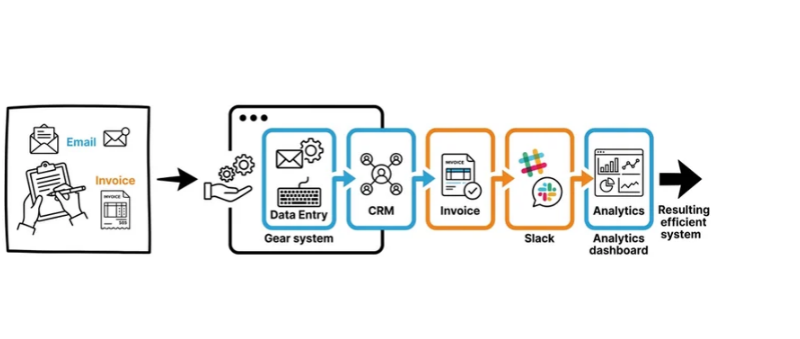
What if your business could save hours every week without hiring another employee? From automatically responding to enquiries to syncing customer data across multiple apps, workflow automation is helping UK businesses reduce repetitive work, minimise costly manual errors, and scale more efficiently. As AI and digital tools become increasingly embedded in everyday operations, the question is no longer whether businesses should automate, but where and how they should start.
Recent UK government research shows that digital technology adoption is now considered a key driver of productivity and growth for businesses, while organisations are steadily integrating AI into their daily operations. If you’re comparing n8n vs make vs zapier, you’re already looking at three of the most capable automation platforms available today. Each offers unique strengths, but the right choice depends on your budget, technical expertise, and long-term business goals.
In this guide, we’ll compare features, pricing, flexibility, and ideal use cases to help you choose the best automation tool for your business.
Why Businesses Are Investing in Workflow Automation in 2026
Manual work continues to slow down growing businesses. Tasks such as updating CRMs, sending follow-up emails, transferring data between applications, generating reports, and processing forms consume valuable hours every week. Automation platforms now make it possible to connect hundreds or even thousands of applications with minimal coding. At the same time, AI-powered workflows are becoming increasingly common for customer support, document processing, lead qualification, and content generation.
According to the latest UK Business Data Survey, 41% of businesses handling digital data now use AI for at least one business purpose, with information gathering and report drafting among the most common applications. Businesses integrating AI into existing systems also demonstrate more advanced digital practices. This growing demand explains why n8n vs make vs zapier has become one of the biggest discussions among businesses planning automation projects. While automation platforms provide the technology, the real value comes from designing workflows that align with your business processes. That’s where implementation partners like we.simplify help businesses move beyond basic automation and build systems that genuinely improve operations.
N8N vs Make vs Zapier: A Quick Overview
Understanding the strengths of each platform makes the n8n vs make vs zapier comparison much easier. Rather than recommending a one-size-fits-all solution, we.simplify helps businesses evaluate their existing processes first before selecting the automation platform that best fits their goals.
Zapier is often the first platform businesses encounter. It focuses on simplicity, allowing users to create automations quickly without technical knowledge. Its huge library of integrations makes it suitable for everyday business tasks.
Make (formerly Integromat) provides a more visual workflow builder with advanced branching, filtering, and data manipulation. It appeals to businesses needing greater flexibility without becoming highly technical.
N8N is an open-source automation platform designed for organisations wanting maximum control. It supports cloud hosting as well as self-hosting, enabling businesses to retain greater ownership of their data while creating highly customised workflows.
N8N vs Make vs Zapier: Key Differences
Choosing between n8n vs make vs zapier becomes much easier when you compare their core features side by side.
| Feature | N8N | Make | Zapier |
| Ease of Use | Best for technical users | Moderate learning curve | Beginner-friendly |
| Pricing | Free self-hosting available, affordable cloud plans | Flexible usage-based pricing | Higher costs as task volume grows |
| Integrations | 500+ native integrations plus custom API support | 2,000+ integrations | 7,000+ integrations |
| Workflow Builder | Visual builder with advanced coding options | Powerful visual drag-and-drop builder | Simple linear workflow builder |
| AI Features | AI nodes and custom AI integrations | AI modules and automation support | Extensive AI app integrations |
| Self-Hosting | Yes | No | No |
| Open-Source | Yes | No | No |
| GDPR Compliance | Excellent for businesses wanting full data control | Cloud-based compliance | Cloud-based compliance |
| Best For | Developers and businesses needing flexibility | Growing businesses with complex workflows | Beginners and quick automations |
Pros and Cons of Each Platform
N8N
Advantages include exceptional flexibility, open-source development, powerful API connectivity, and full self-hosting options. It also delivers excellent scalability for growing organisations. However, beginners may find setup more complex, and advanced workflows often require technical knowledge.
Make
Make balances power with usability. Its visual editor allows sophisticated automation without extensive coding, and its competitive pricing tiers make it popular among businesses. The main drawback is that highly complex scenarios can become difficult to manage as workflows expand.
Zapier
Zapier remains the easiest platform to adopt. It offers excellent reliability, a huge marketplace of integrations, and minimal setup time. The downside is that higher-volume workflows can become expensive, leading many businesses to explore zapier alternatives as they grow.
Which Automation Tool Is Best for Different Types of businesses?
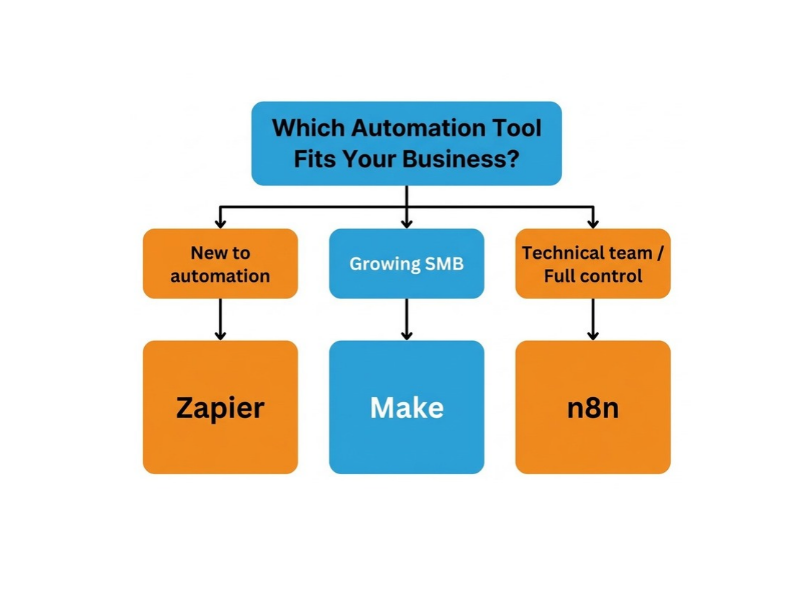
The answer to n8n vs make vs zapier depends on your business requirements rather than which platform has the longest feature list. If you’re launching your first automation project and need quick deployment, Zapier remains the best automation tool for beginners.
If your business needs sophisticated workflows without writing code, Make offers an excellent balance between ease of use and advanced functionality. This is why make vs zapier comparisons often favour Make for growing businesses.
If your organisation has technical expertise or wants complete ownership of its automation environment, n8n delivers unmatched flexibility. Businesses seeking n8n alternatives often discover that few platforms offer the same combination of open-source architecture and custom development capabilities.
How to Choose the Right Automation Platform
When comparing n8n vs make vs zapier, ask yourself a few practical questions. Consider your available budget and expected automation volume. Review whether your existing software ecosystem already has native integrations. Think about whether your team can manage advanced workflows or prefers simple drag-and-drop automation. You should also evaluate future scalability, especially if your organisation expects significant growth over the next few years. Selecting the right platform today can prevent expensive migrations later.If you’re unsure where to start, a free workflow audit by we.simplify can identify repetitive tasks, integration gaps, and automation opportunities before you invest in any platform. This practical approach helps businesses maximise ROI from automation initiatives.
Common Mistakes to Avoid When Choosing an Automation Tool
Selecting an automation platform is a long-term decision. Avoiding these common mistakes can save your business both time and money while ensuring your workflows remain effective as your organisation grows. Working with experienced automation specialists like we.simplify can significantly reduce implementation challenges.
Choosing Based on Price Alone
The cheapest option isn’t always the most cost-effective. Consider the total cost of ownership, including upgrades, task limits, support, and future expansion rather than focusing only on monthly subscription fees.
Ignoring Future Scalability
Many businesses choose a platform that works today but struggles as workflow volumes increase. Select a solution that can grow alongside your business without requiring a complete migration.
Overlooking Integration Requirements
Before committing to a platform, ensure it supports all the applications your business relies on. Missing integrations can lead to manual work or expensive custom development.
Underestimating the Learning Curve
Some platforms offer greater flexibility but require more technical knowledge. Choose a solution that matches your team’s skills and the time available for implementation and maintenance.
Forgetting Data Security and GDPR Compliance
Businesses handling customer information should evaluate where data is stored, who has access to it, and whether the platform meets their compliance requirements. This is particularly important for UK organisations operating under GDPR.
Which Automation Platform Is Right for Your SMB?
The n8n vs make vs zapier debate has no universal winner because each platform serves a different type of business. Zapier remains the easiest choice for beginners who want to automate everyday tasks quickly. Make strikes an excellent balance between usability and advanced workflow design, making it ideal for growing businesses. Meanwhile, n8n stands out for organisations that value flexibility, self-hosting, and complete control over their automation infrastructure.
Ultimately, the best automation tool is the one that aligns with your budget, technical expertise, security requirements, and long-term growth plans. By carefully assessing your current workflows and future needs, you can invest in an automation platform that delivers lasting value well beyond 2026. Whether you’re implementing your first workflow or scaling AI-powered automation across departments, having the right strategy is just as important as choosing the right software. we.simplify focuses on building automation solutions that fit real business operations rather than forcing businesses to adapt to technology.
Ready to find your best automation opportunities? Book a free workflow audit with we.simplify to identify repetitive processes, integration gaps, and practical ways to automate your operations.