How many people does it really take to process one invoice?
If the answer involves an inbox, spreadsheet, approval email and ERP entry, your finance team is doing far more than processing invoices. For enterprises handling thousands of invoices across suppliers, departments and countries, the challenge is rarely receiving the invoice. It is everything that happens after it arrives. Manual data entry, approval delays, matching errors and repeated hand-offs do more than slow accounts payable. They create an administrative ceiling, tying finance capacity to transaction volume as the business grows.
That is where automated invoice processing software becomes valuable. Instead of treating an invoice as a document someone needs to read and move along, automation turns it into structured business data that can be captured, validated, matched, approved and posted with minimal intervention. The result is not simply faster invoice processing. It is a more connected, controlled and scalable accounts payable workflow.
What Is Automated Invoice Processing Software?
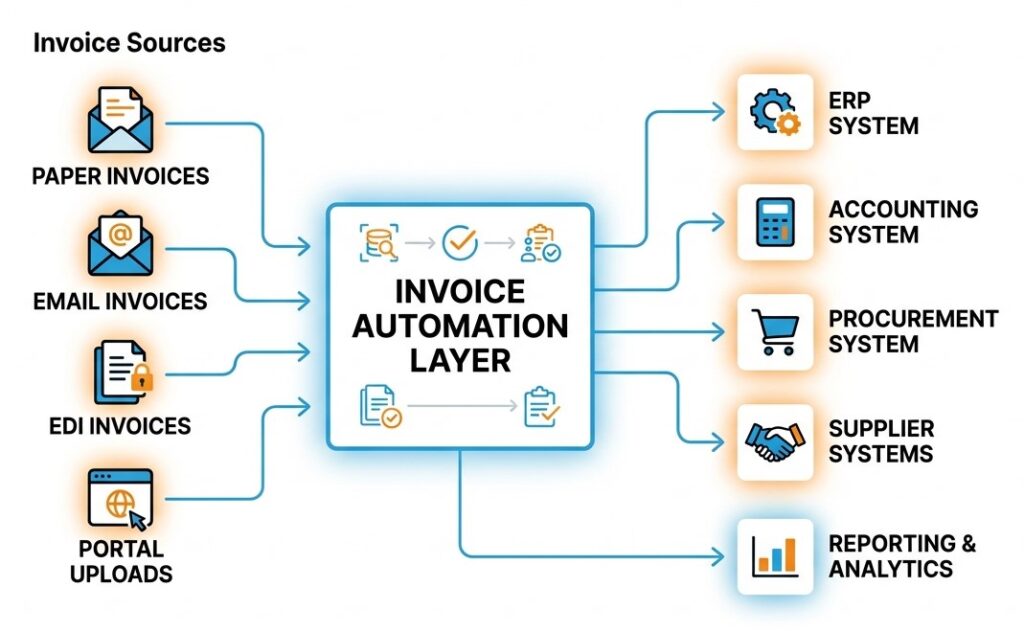
Automated invoice processing software uses technologies such as OCR, AI, workflow automation and system integrations to capture invoice information, validate it against business rules and related records, route it for approval and transfer approved data into ERP or accounting platforms.
The key difference is that digitisation alone does not automate accounts payable. True automation connects document capture with validation, purchasing data, approvals, exception management and financial posting. For enterprises, the goal is not simply fewer keystrokes. It is a controlled workflow where predictable invoices move automatically while unusual transactions are escalated for human review.
How It Differs from Manual Invoice Processing
In a manual environment, an invoice may arrive by email, be downloaded, entered into a spreadsheet or ERP, checked against a purchase order and forwarded to an approver. Once approved, the information may need to be entered again before payment. Every hand-off creates another opportunity for delay or error. With automated invoice processing software, these activities become connected stages of one workflow. An incoming document can be captured, its data extracted and validated, matched with purchasing records and routed to the right approval path.
The human role consequently shifts from moving invoices between systems to handling exceptions, supplier issues and financial controls. Every hour recovered from routine invoice handling can instead support supplier management, cash-flow planning and other higher-value finance work. This process-first approach is also central to how we.simplify approaches enterprise automation. This process-first approach is also central to how we.simplify approaches enterprise automation.
Touchless vs Straight-Through Processing
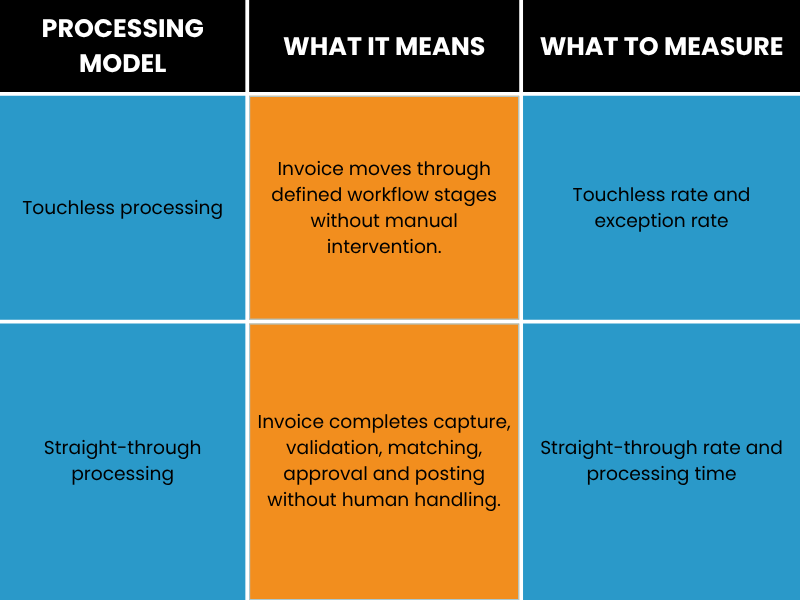
The more meaningful measure is how many invoices reach posting without manual intervention, correction or unnecessary exception handling.
How Automated Invoice Processing Software Works
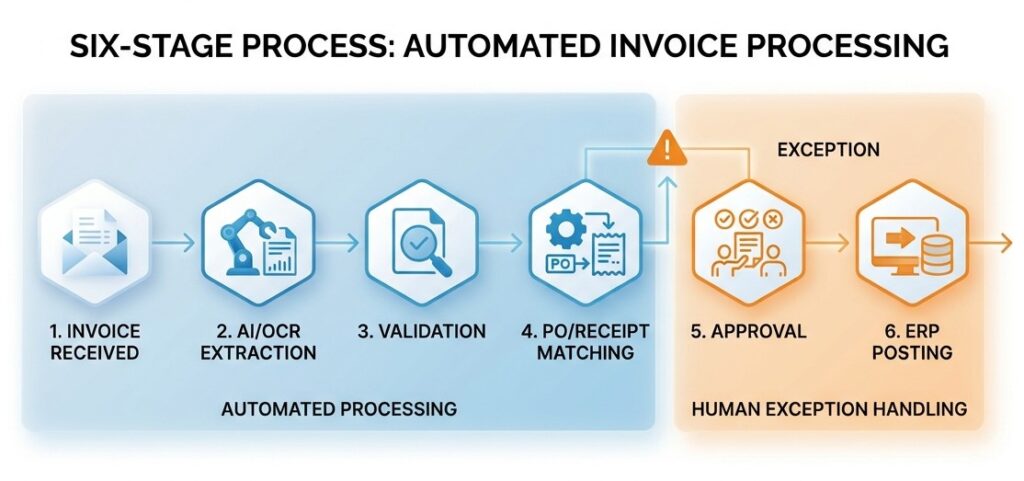
The process generally follows six stages: invoice capture, data extraction, validation, matching, approval and posting. The exact workflow depends on the organisation’s ERP environment, purchasing policies and invoice types.
OCR Invoice Data Extraction
OCR converts text from PDFs, scans and images into machine-readable information. Traditional OCR can work well with predictable documents, but enterprises receive invoices in different layouts, formats and languages. Modern OCR invoice data extraction combines document recognition with AI to identify supplier details, invoice numbers, dates, purchase orders, tax amounts, currencies, line items and totals.
Extraction should also include confidence scoring and validation. If a tax value is uncertain, for example, the system should flag that field rather than requiring someone to review the entire invoice.
Invoice Capture Software & Data Validation
Invoice capture software forms the intake layer of the workflow. It can collect invoices from monitored email addresses, scanning channels, supplier portals and electronic feeds. Once an invoice enters the system, validation rules can check whether the supplier exists, mandatory fields are present, tax calculations are reasonable and the invoice number has already been processed.
Validation can also check purchasing records. This is where invoice automation software moves beyond document management. The system can determine whether an invoice is ready for the next stage or requires investigation.
Matching, Approval Workflows & Posting
Matching is one of the most important controls in invoice automation. A two-way match compares an invoice with its purchase order, while a three-way match also checks the goods-receipt record. In high-volume purchasing environments, automating these checks can prevent small quantity, pricing or delivery discrepancies from multiplying across hundreds or thousands of transactions. For example, if an order specifies 100 units at £20 each but an invoice requests payment for 120, the system can flag the discrepancy before payment.
Approval workflows can consider value, department, entity, cost centre, supplier or exception type. Once requirements are satisfied, the transaction can be posted to the ERP without another round of manual entry.
Key Benefits of Automated Invoice Processing
Faster Approvals & Reduced Errors
Automation reduces both processing activity and waiting time. Invoices no longer need to sit unnoticed in inboxes, while approvers do not need to manually forward routine transactions. According to 2026 benchmark data from Parseur, average invoice cycle time is 9.2 days compared with 3.1 days for best-in-class teams. Touchless processing averages 32.6%, compared with 49.2% for best-in-class organisations.
The key benefit is therefore not digitisation alone, but removing friction from the workflow.
Cost Savings vs Manual Processing
Invoice processing costs include labour, exception handling, rework, duplicate payments and approval delays. But the bigger opportunity is often capacity. When routine invoices no longer require constant manual attention, finance teams can handle growing transaction volumes without increasing administrative effort at the same rate.
Enterprises should still build their own business case using invoice volume, current cost per invoice, touchless rate, exception frequency and integration costs. The opportunity cost matters too: what could finance teams do with the hours currently spent chasing approvals, re-entering data and resolving avoidable errors?
Paperless Invoice Management & Compliance
Paperless invoice management creates a central digital record instead of relying on physical files and scattered email attachments. Invoices become easier to search, retrieve and audit while reducing administrative storage. A properly configured system can also maintain an audit trail showing when an invoice was received, what information was extracted, who approved an exception and when it was posted.
However, compliance requires more than digitisation. Retention periods, tax rules, electronic invoicing requirements and approval controls vary by jurisdiction and must be built into the workflow.
Must-Have Features in Invoice Automation Software
OCR & AI Data Capture
A capable platform should handle different supplier layouts, line items and document formats. Confidence scoring and exception handling are equally important because extraction technology should not be treated as infallible. OCR invoice data extraction should therefore connect directly to validation rather than operate as a standalone document-conversion tool.
PO Matching (2-Way / 3-Way)
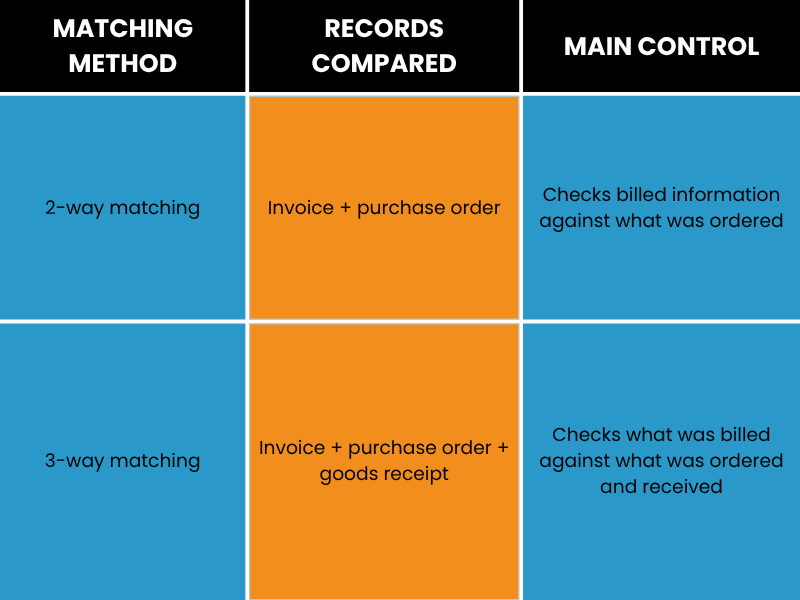
Three-way matching is particularly useful where quantity, delivery or pricing discrepancies create payment risk. Tolerance rules can prevent minor variations from generating unnecessary manual work.
ERP & Accounting Integration
Integration determines whether automation actually reaches the financial record. A strong automated invoice processing software architecture should connect invoice capture, procurement, approval workflows and ERP posting rather than create another isolated system. API capabilities, connectors, authentication, master-data synchronisation and error handling should all be assessed.
This is particularly important for enterprises operating multiple ERP instances or undergoing transformation. Automation should strengthen the existing technology landscape, reducing the need for employees to move data manually between systems. we.simplify takes this broader process-first approach, connecting workflows around the systems enterprises already use.
E-Invoicing Software Compliance
E-invoicing software supports the creation, exchange, validation and processing of invoices in required electronic formats and networks. This is increasingly important as electronic invoicing mandates expand across jurisdictions. Multinational organisations may need different formats, tax rules and routing requirements across markets.
The technology should therefore support configurable country, tax, entity and compliance requirements rather than rely on a single workflow.
How to Choose the Right Invoice Processing Solution
Step 1 – Map Your Current Invoice Workflow
Before selecting technology, document what actually happens. Trace where invoices arrive, who handles them, where purchase-order information is checked, which approvals are required and how data reaches the ERP. Include exceptions because they often consume more effort than standard invoices. This can reveal unnecessary hand-offs that are difficult to identify when each department only sees its own part of the process.
Step 2 – Define Must-Have Features
Features should follow the process rather than the other way around. Requirements may include AI extraction, PO matching, duplicate detection, multi-entity support, configurable approvals, audit trails, reporting and integration with existing finance systems. Invoice capture software should also support the channels suppliers actually use. An unrealistic submission process can create resistance and undermine adoption.
Step 3 – Evaluate Integration & Scalability
Assess the solution against future requirements as well as current invoice volumes. Consider what happens when the organisation adds an entity, acquires another business, introduces another ERP or enters a new country. Scalability includes workflow configuration, supplier onboarding, permissions, monitoring and compliance, not simply document capacity. The right invoice processing solution should also provide visibility into where invoices are waiting and why.
Step 4 – Pilot Before Full Rollout
A pilot should use real invoice types rather than idealised test documents. Include different suppliers, PO and non-PO invoices, common exceptions and actual approval structures. Compare the results against the existing process.
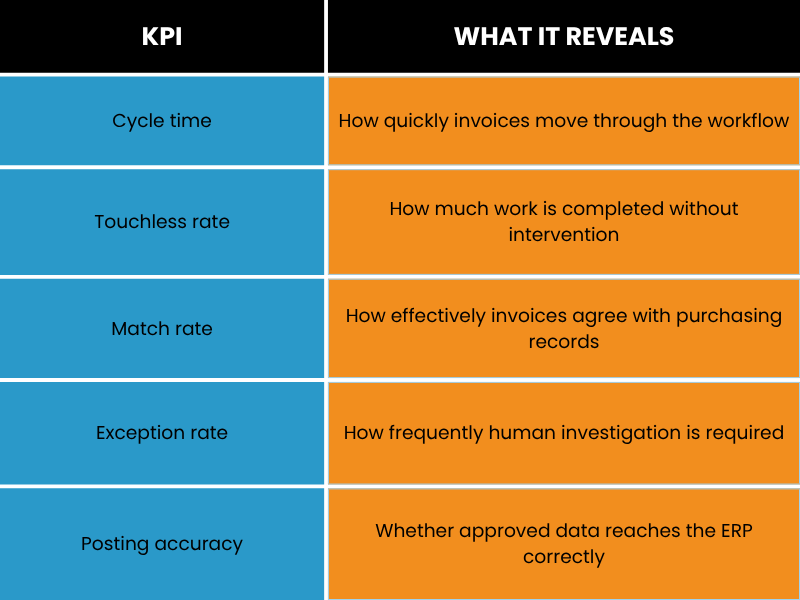
A successful pilot should demonstrate measurable process improvement, not simply prove that invoices can be scanned.
Automated Invoice Processing: 2026 Trends
AI-Driven Data Capture
Invoice automation is moving beyond fixed templates towards systems that interpret context. The practical value of AI is not simply recognising more fields; it is helping systems interpret inconsistent invoices, identify anomalies and determine when an invoice can continue automatically or needs human attention. This is particularly useful for enterprises receiving invoices from large supplier networks with inconsistent formats. OCR invoice data extraction is increasingly becoming part of a broader intelligent workflow rather than a standalone scanning function.
Rising Touchless Processing Rates
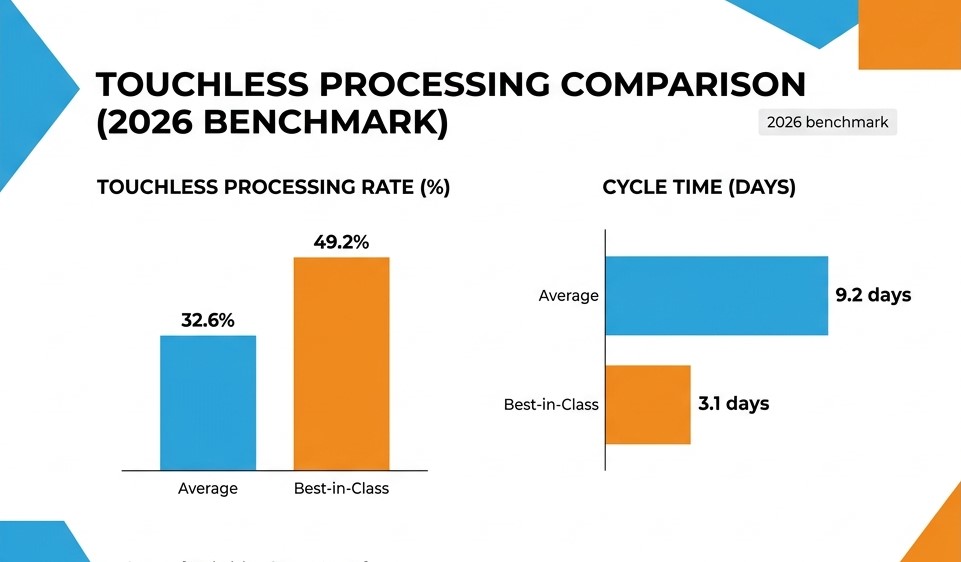
The next measure of automation maturity is not how many invoices are digitised, but how many complete the workflow without manual intervention while maintaining appropriate controls. DHL’s global procure-to-pay programme demonstrates the scale of this challenge, with standardisation and automation implemented across multiple countries and enterprise systems. The lesson is not that every organisation needs the same platform. Global automation requires standardised processes, integration and controlled local adaptation.
The objective is not to eliminate human involvement entirely. It is to automate predictable work, surface exceptions and give people the context needed to resolve them. we.simplify applies this approach to enterprise workflows, helping organisations turn repetitive manual effort into scalable operational capacity.
FAQs
What is automated invoice processing software?
It is technology that captures invoice information, extracts and validates data, matches invoices against purchasing records, manages approvals and transfers approved information into financial systems with minimal manual intervention.
How much does invoice automation software cost?
There is no universal price. Costs depend on invoice volume, document complexity, users, integrations, implementation requirements and regional compliance.
A proper business case should compare total ownership costs with the organisation’s existing cost per invoice.
Does invoice automation integrate with my ERP or accounting system?
Enterprise platforms commonly integrate through APIs, connectors or middleware. The key consideration is whether the integration supports your specific ERP configuration, entities, master data and posting requirements.
Is OCR accurate enough for invoice processing?
Modern AI-assisted extraction can achieve strong results, but accuracy varies according to document quality, layout, field complexity and language. The safer approach is to combine extraction confidence with validation, matching and human review for exceptions.
From Manual Invoice Handling to Intelligent Automation
The value of automated invoice processing software is not simply reading invoices faster. It is connecting the entire invoice lifecycle, from capture and validation to matching, approval and ERP posting. For enterprises, the strongest implementations start with the process rather than the technology. Identify where invoices wait, where data is entered twice, where approvals stall and where exceptions consume the most time. Then build automation around those realities.
That is the approach we.simplify brings to enterprise automation: understand how work moves through the organisation, remove unnecessary manual effort and connect the systems and workflows that keep operations moving. If your finance team is still spending valuable time chasing invoices, entering data or managing routine approvals, it is worth examining how much of that work can be automated.
The question for 2026 is no longer whether invoices can be digitised. It is: how much of the invoice workflow should still require a person to touch it?
Not sure where automation would make the biggest difference? Talk to we.simplify about mapping your current invoice workflow and identifying the bottlenecks, manual hand-offs and exceptions worth automating first.